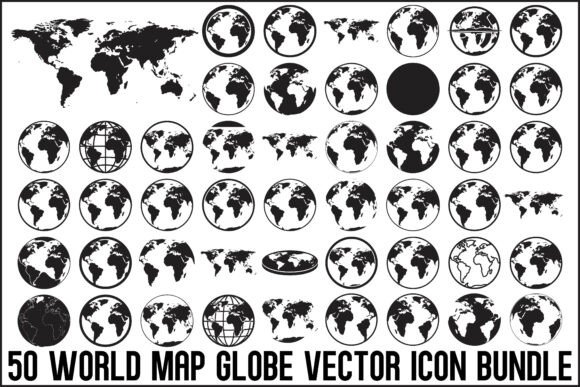
World Map Globe Vector Icon Bundle: 50 Icons for Global Projects
When you're building a brand that operates on a global scale, or creating educational materials about our planet, you need visual shorthand that communicates instantly. A well-designed globe icon does more than decorate—it establishes context, builds trust, and tells your audience exactly what your project is about before they read a single word. That's the real value behind a comprehensive World Map Globe Vector Icon Bundle.
This collection isn't just a random assortment of map outlines. It's 50 carefully crafted black silhouette icons, each one designed with a clean, modern aesthetic that works across dozens of applications. Whether you're a freelancer juggling client projects or a small business owner refreshing your brand identity, having this kind of versatile design asset library at your fingertips changes how quickly you can execute professional work.
Why Black Silhouette Globe Icons Remain a Design Staple
There's a reason designers keep returning to black silhouette iconography. It strips away visual noise and communicates the core idea with absolute clarity. A globe rendered in solid black against a white background reads perfectly at thumbnail size on a smartphone screen and scales up beautifully for a trade show banner. That kind of flexibility matters when your brand touchpoints span everything from social media graphics to printed packaging.
The World Map Globe Vector Icon Bundle leans into this strength deliberately. Each icon avoids unnecessary detail—no gradient fills, no decorative flourishes, no trendy color palettes that will feel dated in eighteen months. Instead, you get bold, confident shapes that integrate seamlessly into virtually any design system. Think of these as the typographic equivalent of a clean sans serif font: they do their job without demanding attention, which paradoxically makes them more effective.
That said, the variety within the bundle prevents monotony. You're not getting 50 identical circles with continents drawn on them. The collection includes different perspectives, map projections, continent focuses, and stylistic interpretations. Some icons emphasize the globe as a three-dimensional object. Others flatten it into a more abstract world map representation. This range gives you options depending on whether your project calls for something literal or something more conceptual.
Practical Applications Across Industries and Projects
Let's talk about where these icons actually get used, because that's where the value becomes concrete.
Travel and tourism brands are an obvious fit. A travel agency website needs globe imagery in its header, its favicon, its booking confirmation emails, and its printed brochures. Having 50 variations means you can differentiate between sections of your site—maybe one globe style for destination pages, another for customer testimonials, a third for your company's sustainability commitments. Consistency within variety keeps your visual identity cohesive without feeling repetitive.
Educational publishers and content creators face a different challenge. Geography textbooks, online courses, and classroom posters all need icons that are immediately recognizable to students of different ages. The clean silhouette style in this bundle works particularly well for educational materials because it doesn't compete with surrounding content. It frames information rather than distracting from it. If you're designing an infographic about global trade patterns or climate zones, these globe icons provide the visual anchor your layout needs.
Corporate and NGO branding is where things get strategic. A sustainability-focused company, an international consulting firm, or a nonprofit working across borders all need to signal their global reach through their brand identity. Globe icons appear in logos, letterheads, presentation templates, and social media profiles. The professional quality of vector files matters here—pixelated or poorly traced icons undermine credibility instantly. This bundle delivers print-ready vectors that maintain their crispness whether they're embroidered on a polo shirt or projected on a conference screen.
Crafters and makers represent another audience entirely. If you own a Cricut or Silhouette Cameo machine, you understand the frustration of finding design files that actually cut cleanly. SVG files from this bundle are optimized for vinyl cutting, laser engraving, and screen printing. Imagine creating a set of globe-themed wall decals for a child's bedroom, or engraving a world map onto leather journal covers for an Etsy shop. The file formats included—SVG, EPS, AI, PNG, JPG, and PDF—cover virtually every production method you might encounter.
Working With the Files: Format Flexibility and Customization
One aspect that separates a genuinely useful icon bundle from a frustrating one is file format coverage. The World Map Globe Vector Icon Bundle includes six formats, and each one serves a specific purpose in real workflows.
SVG files are your go-to for web design, UI/UX projects, and any cutting machine work. They scale infinitely without quality loss and load efficiently on websites. If you're building a dashboard for a logistics company or designing app interfaces that communicate international shipping routes, SVG is the format you need.
EPS and AI files give professional designers full editability in Adobe Illustrator and other vector editing software. You can recolor elements, adjust line weights, combine icons with other design assets, or incorporate them into larger illustrations. This is where the "fully editable" promise actually matters—you're not locked into the original design.
PNG files with transparent backgrounds handle the situations where you need quick placement over photographs, colored backgrounds, or complex layouts. Presentation slides, blog headers, social media posts—these are the everyday use cases where PNG saves you time.
JPG and PDF files round out the collection for print projects and documentation purposes. A print-on-demand seller uploading designs to Redbubble or Merch by Amazon will appreciate having production-ready files without additional conversion steps.
Choosing the Right Icon for Your Specific Project
With 50 options, selection can feel overwhelming. Here's a practical approach I recommend.
Start by defining your icon's primary context. Is it functioning as a logo design element? Choose something distinctive with strong silhouette recognition. Is it a supporting element in editorial design or a presentation deck? Prioritize simplicity and consistency with your existing visual hierarchy. Is it part of a packaging design for a product sold internationally? Consider how the icon reads at very small sizes on physical labels.
Next, think about your audience's expectations. A globe icon for a children's education platform can afford to be friendlier and more illustrative. The same icon used in a financial services annual report should feel authoritative and restrained. The range within this bundle accommodates both ends of that spectrum.
Finally, test your chosen icon in context before committing. Place it alongside your existing typography—whether that's a serif font for a traditional feel or a sans serif font for something more contemporary. Check how it pairs with your color palette. Print a test version at the size it will actually appear. These practical steps prevent the common mistake of selecting an icon in isolation and discovering later that it clashes with the rest of your design system.
The bottom line is this: a well-curated set of globe and world map icons solves real creative problems across an unusually wide range of projects. Whether you're building a brand identity from scratch, refreshing marketing collateral, creating educational resources, or producing physical products, having professional-quality vector icons ready to deploy saves time, maintains consistency, and elevates the perceived quality of your work. That's not theoretical—it's the practical reality of working with thoughtfully designed design assets.